Monday, January 26, 2015

Vodafone B4000 LTE-Advanced Router Available in Portugal

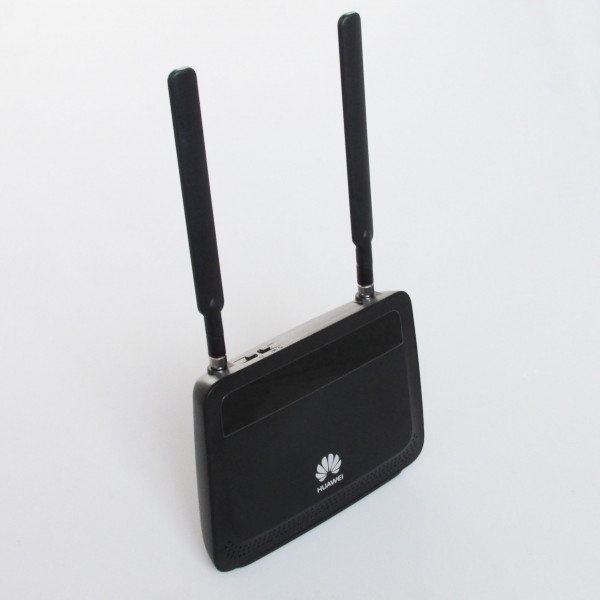
Portugal is the first country where the new Vodafone B4000 LTE-Advanced Router is available. Since mid-June you can purchase your new router there, either without contract or with a mobile phone contract. And we can see there are many shops selling unlocked Vodafone B4000 without any contract. If you don’t want to be tied with the network operators, you can consider this unlocked one. The Vodafone B4000 router is manufactured by Huawei and there carries the model name of Huawei E5186. It is the world's first LTE router for LTE-Advanced (LTE category 6), depending on the tariff and network, up to 300 megabits per second in the downlink can be achieved.
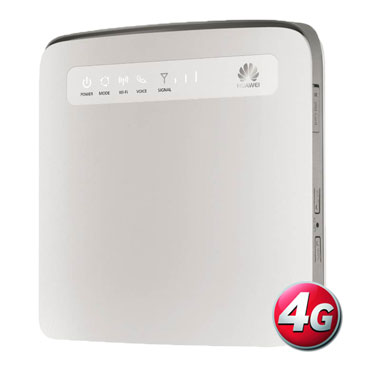


The Vodafone B4000 LTE-Advanced Router will be available over the summer in Germany with Vodafone, we could look at the device 2014 at the CeBIT already precisely. The factory model Huawei E5186 is already available on the market without operators’ logo and customization, it would be great for those who don’t need the operators’ contract. User can buy Huawei E5186 as alternative.  

LTE with up to 300 MBit/s downlink


It is the first time the carrier aggregation technology can be bundled support on LTE Category 6, with the various frequency bands. So you can reach up to 300 megabits per second in the downlink in a first stage with 2 × 2 MIMO antenna technology, uploads of up to 50 Mbit/s are as previously possible. The downlink of a doubling of speed compared to LTE Category 4 speed cannot automatically be used from any vendor supporting LTE Category 6: it is expected in Germany "only" 225 Mbit/s to apply on Vodafone, while Vodafone Portugal support up to 300 MBit/s.  


WLAN ac and Gigabit Ethernet


The Vodafone B4000 or the Huawei E5186 installed the new WLAN ac for the first time in a cellular router as standard. Assuming a corresponding terminal to LTE category 6 may as well use full wireless speed. But not only the radio interface has been optimized, and the Ethernet ports on the back of Vodafone B4000 are much faster than in previous devices Vodafone B2000 and Vodafone B3000. They now offer speeds of up to 1 Gbit/s. Vodafone has already demonstrated LTE-Advanced in live operation at the CeBIT 2014. Press representatives could see speeds well in excess of 200 Mbit/s. according to a statement, Vodafone plans from March, the introduction of LTE-Advanced category 6 for the summer of 2014. with a start to the IFA technology, trade show in early September is considered highly probable in Berlin. Here many new products, services and technologies were launched in previous years.

Tuesday, January 20, 2015

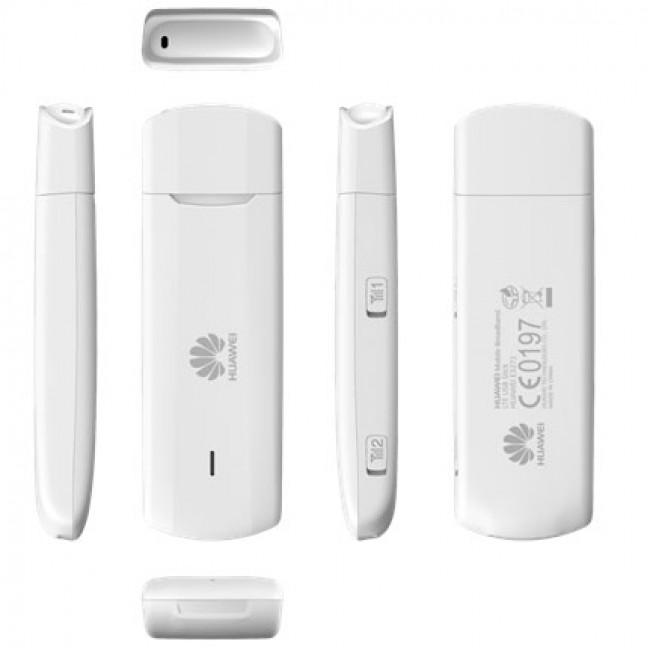
Huawei E3272 4G USB Stick Review

After Huawei E3276, Huawei offers a new model called E3272 for its LTE Stick series. Of course, the model supports LTE Category 4 (up to 150 Mbps) and this is the key feature for this new model. We show more details of E3272 below and reveal whether the acquisition of the mobile travel companion is worthy.


LTE features and characteristics of Huawei E3272

Manufacturer and model number Huawei E3272
Download rate Up to 150 MBit/s
Upload rate Up to 50 MBit/s
Supported LTE bands LTE800; LTE900; LTE1800; LTE2100; LTE 2600 ( Band 1/3/7/8/20)
Backward compatible with: DC-HSPA+, UMTS, GSM-Frequency (850, 900, 1800 and 1900 MHz)
MIMO Support: MIMO 2x2
Connector for external antenna yes; 2 antenna connectors type CRC-9 available
LTE Category: LTE Modem to Category 4 (CAT4)
Chipset HiSilicon Balong 710 (V7R1)
Others
Dimensions (LxWxH) 93.3 mm x 30 mm x 13,3 mm; 35 Gramm
USB-Standard USB 2.0
Memory card expansion yes; With 32 GB MicroSD
Compatible Operating Systems Windows XP, Windows Vista, Windows 7+8, Mac OS (above 10.4)


 Huawei unveiled the device for more than one year; it is easy to find shop online for Huawei E3272. Now it’s already available for many European operators.     From the appearance, we can see huawei E3272 is not similar to E3276, which has a rotatable USB, while E3272 is a compact USB. Users should not be blinded by the lower model number after the "E". For Huawei means, confusingly, higher is not always new. User might think that the technology department rolls this out for the marketing department.


The most important is that we can benefit from Huawei sticks. Huawei E3272 supports the frequencies 800, 900, 1800, 2100 and 2600 MHz - hence the E3272 could work with all major providers in Europe areas. With unlocked Huawei E3272, user can travel to Middle East and Asia. As already indicated, the LTE modem is compatible with LTE Category 4, which can be achieved download speeds of up to 150 Mbps and upload speed up to 50 Mbps. In addition, the Huawei E3272 is backward with all relevant previous mobile radio standards (3G/2G). If located not at LTE coverage area, your device automatically switches to the next best technology, such as UMTS or HSDPA.  

A key difference for E3272 and E3276 is the built-chipset. Here Huawei E3272 relies on a HiSilicon Balong 710 (V7R1). Also new is a "HiLink" mentioned technology, which we introduce the following short.       "HiLink" hides an innovation from Huawei, which aims to accelerate the start-up and thus to connect to the Internet enormously. After plugging in, as promised by the manufacturer, Configuration shall be unnecessary and it is online only 15 seconds. 15 seconds is for driver auto installation, setup, and connection! This is a small revolution in fact. Our editorial team has already taken several tests with various sticks, such as ZTE, in the past. Some devices need only  install the software for up to 15 minutes, followed by complex configuration and excruciatingly long load times if necessary. Now it is finally turned to the Web Interface. This means installing extra software is no longer necessary - the operation easily handled via the browser, so as the Huawei E3272. However, "HiLink" is not a novelty from the E3272. Various predecessors already had the feature.    

One criticism, however, is still there. While many other models of Huawei have a swiveling USB port, which proved to be user-friendly, but Huawei E3272 is unfortunately missing this feature. When used in conjunction with a laptop, user has to connect the E3272 via USB extension cable.    

The E3272 is a rock solid LTE stick, which is technically on the amount of time. Those who does not need a Wi-Fi hotspot, can safely access via E3272. The relatively low price convinced. Significant innovations and improvements are attractive.  

Monday, January 5, 2015

Huawei E3272 4G USB Stick Review

After Huawei E3276, Huawei offers a new model called E3272 for its LTE Stick series. Of course, the model supports LTE Category 4 (up to 150 Mbps) and this is the key feature for this new model. We show more details of E3272 below and reveal whether the acquisition of the mobile travel companion is worthy.


LTE features and characteristics of Huawei E3272

Manufacturer and model number Huawei E3272
Download rate Up to 150 MBit/s
Upload rate Up to 50 MBit/s
Supported LTE bands LTE800; LTE900; LTE1800; LTE2100; LTE 2600 ( Band 1/3/7/8/20)
Backward compatible with: DC-HSPA+, UMTS, GSM-Frequency (850, 900, 1800 and 1900 MHz)
MIMO Support: MIMO 2x2
Connector for external antenna yes; 2 antenna connectors type CRC-9 available
LTE Category: LTE Modem to Category 4 (CAT4)
Chipset HiSilicon Balong 710 (V7R1)
Others
Dimensions (LxWxH) 93.3 mm x 30 mm x 13,3 mm; 35 Gramm
USB-Standard USB 2.0
Memory card expansion yes; With 32 GB MicroSD
Compatible Operating Systems Windows XP, Windows Vista, Windows 7+8, Mac OS (above 10.4)


Huawei unveiled the device for more than one year; it is easy to find shop online for Huawei E3272. Now it’s already available for many European operators.     From the appearance, we can see huawei E3272 is not similar to E3276, which has a rotatable USB, while E3272 is a compact USB. Users should not be blinded by the lower model number after the "E". For Huawei means, confusingly, higher is not always new. User might think that the technology department rolls this out for the marketing department.


The most important is that we can benefit from Huawei sticks. Huawei E3272 supports the frequencies 800, 900, 1800, 2100 and 2600 MHz - hence the E3272 could work with all major providers in Europe areas. With unlocked Huawei E3272, user can travel to Middle East and Asia. As already indicated, the LTE modem is compatible with LTE Category 4, which can be achieved download speeds of up to 150 Mbps and upload speed up to 50 Mbps. In addition, the Huawei E3272 is backward with all relevant previous mobile radio standards (3G/2G). If located not at LTE coverage area, your device automatically switches to the next best technology, such as UMTS or HSDPA.  


A key difference for E3272 and E3276 is the built-chipset. Here Huawei E3272 relies on a HiSilicon Balong 710 (V7R1). Also new is a "HiLink" mentioned technology, which we introduce the following short.       "HiLink" hides an innovation from Huawei, which aims to accelerate the start-up and thus to connect to the Internet enormously. After plugging in, as promised by the manufacturer, Configuration shall be unnecessary and it is online only 15 seconds. 15 seconds is for driver auto installation, setup, and connection! This is a small revolution in fact. Our editorial team has already taken several tests with various sticks, such as ZTE, in the past. Some devices need only  install the software for up to 15 minutes, followed by complex configuration and excruciatingly long load times if necessary. Now it is finally turned to the Web Interface. This means installing extra software is no longer necessary - the operation easily handled via the browser, so as the Huawei E3272. However, "HiLink" is not a novelty from the E3272. Various predecessors already had the feature.    


One criticism, however, is still there. While many other models of Huawei have a swiveling USB port, which proved to be user-friendly, but Huawei E3272 is unfortunately missing this feature. When used in conjunction with a laptop, user has to connect the E3272 via USB extension cable.    


The E3272 is a rock solid LTE stick, which is technically on the amount of time. Those who does not need a Wi-Fi hotspot, can safely access via E3272. The relatively low price convinced. Significant innovations and improvements are attractive.  

Wednesday, November 5, 2014

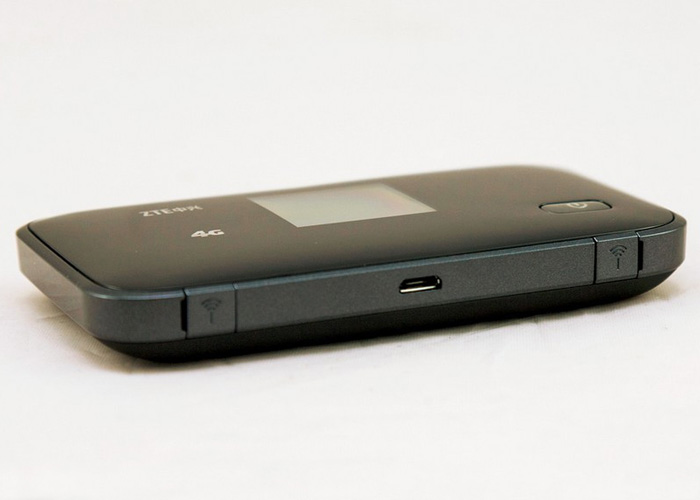
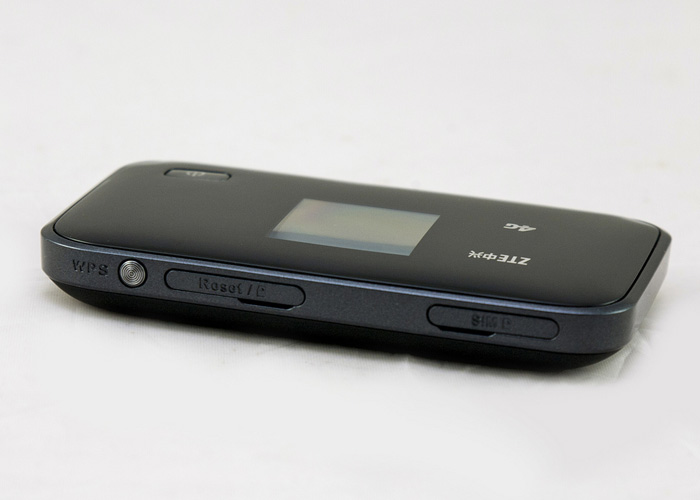
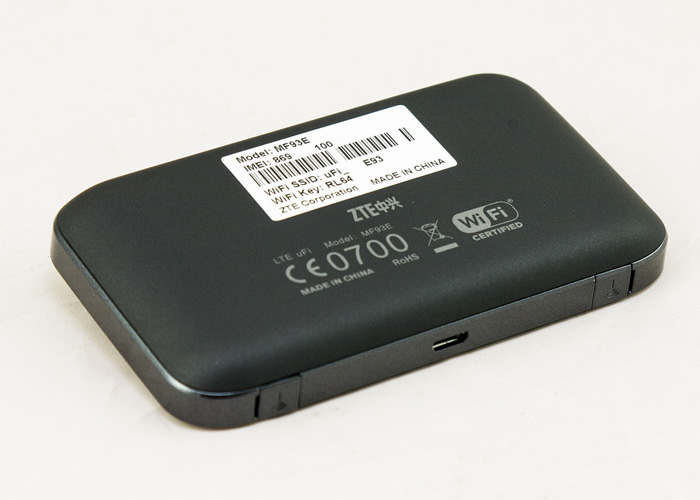
ZTE MF93E 4G LTE Mobile Hotspot Review

Following Huawei E5776, the candidates ZTE has a new 4G mobile hotspot now with LTE support and colorful screen on offer - ZTE MF93E. We have all the key data summarized for you and show you where advantages and disadvantages are similar to Huawei models and whether the purchase worthwhile.


LTE features and characteristics of ZTE MF93E
Manufacturer and model number ZTE MF93E
Download rate up to 100 MBit/s
Upload rate up to 50 MBit/s
Supported LTE bands LTE 1.8, 2.6 GHz (FDD) & 2.3, 2.6 GHz (TDD)
Backward compatible with: DC-HSPA+ / HSPA+ / UMTS / EDGE / GSM / GPRS
Support LTE-Advanced no
MIMO Support: MIMO 2x2
Connector for external antenna yes; 2 antenna sockets, type TS-9 available (buy ZTE MF93E antenna)
LTE Category: LTE Modem to Category 3 (CAT3)
Chipset Qualcomm MDM9215
Others
Dimensions (LxWxH) 107 mm x 61 mm x 16 mm and 105 Gramm
USB-Standard USB 2.0
Memory card expansion yes; With 32 GB MicroSD
Battery capacity 2800 mAh,  10 hours
Compatible Operating Systems Windows XP, Windows Vista, Windows 7+8, Mac OS (above 10.4)
Release March 2014
Availability on www.4gltemall.com
Handbuch PDF unfortunately not yet available online


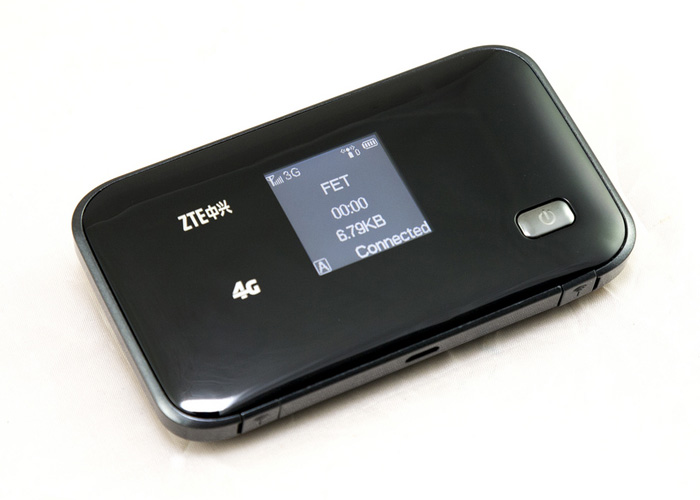
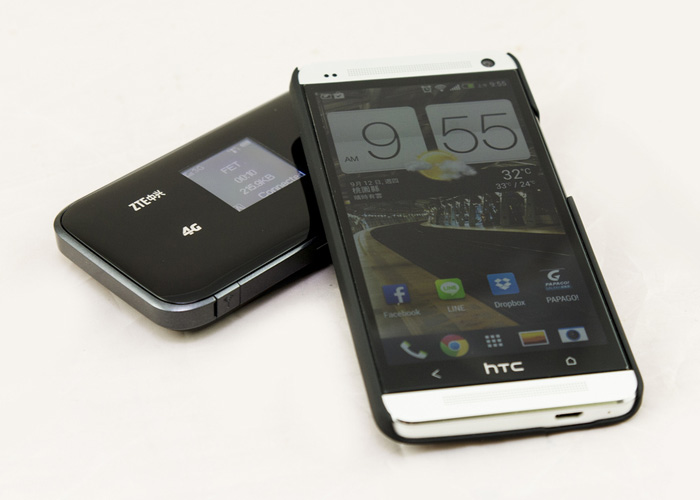
ZTE MF93E is a so-called "mobile hotspot" router. This type of device looks like space-saving mobile phone in pocket size, but they would provide just wireless network with router function. So users can go outside not just with one terminal, actually , in this case, up to 10 wireless devices could be taken if there is ZTE MF93E in hand.  


Technical data


The ZTE MF93E supports LTE category 3 at 1800 & 2600 MHz (FDD mode), and 2300 & 2600 in the TDD modulation mode. The latter, however, is largely prevalent in Asia. The LTE band 800 MHz is not covered, which means some insignificant shortcoming in certain area and countries. LTE Category 3 allowed data rates of up to 100 Mbps for downstream and 50 Mbps for upstream. In addition, however, the router can also access major 3G and 2G standards to the Internet, such as UMTS, HSPA+, EDGE or GSM.  


The WLAN module is working on 802.11b/g/n, so that internal networking data rates of up to 150 Mbps can be achieved. This is not necessarily "often state the art", but at least functional. After all, this is not self-evident; the operation in the dual band of 2.4 GHz and 5 GHz is possible. In addition, there are two TS-9 ports located on the bottom for connecting an external antenna to the receiving optimization. ZTE MF93E has a battery of quite handsome capacity of 2800 mAh, which should be sufficient for 9-10 hours operating time. Of course, the user can also operate on AC power, provided a power source is present.        


Display


On the front, ZTE MF93E has built a color information display. This is partly for control and also displays any relevant connection status, such as the radio standard used or surfing data volume during the online session.  


There is no doubt that ZTE MF93E is a very visually attractive device. Since the release time is too long ago in the first quarter of 2014, there are no technically new similar models for competition. The MF93E is most likely comparable with Huawei E589, which has similar specifications, but not all.  


In conclusion, ZTE MF93E satisfies the LTE category 3, and supports the maximum speed to 100Mbps, which is good enough for normal use under good network condition. Also the battery is good enough with 3000 mAh capacity. But if you want LTE category 4 mobile WiFi, the best alternative would be the Huawei E5372, which is already offering LTE Category 4 and connection speed reach up to 150mbps. Whether you think ZTE MF93E is suitable for you or not, you must make your own decision if you a real good 4G pocket MiFi.  

Tuesday, November 4, 2014

Huawei E5372 4G LTE MiFi

Huawei E5372 was supposed to be the best LTE MiFi Router since 2013. Because E5372 MiFi is characterized by the support of almost all currently popular mobile radio standards, and has excellent mobility characteristics, thus Huawei E5372 is ideally suited for travel. We have found the following the most important features of E5372, along with the test report.


Features and characteristics of Huawei E5372

Manufacturer and model number Huawei E5372
Download rate Up to 150 MBit/s
Upload rate bis Up to 50 MBit/s
Supported LTE Bands: LTE Band 800, 900, 1800, 2100 and 2600 MHz
Backup compatible Standards HSPA+, HSUPA, UMTS 850, 900 and 2100 MHz;EDGE, GPRS (2G) 850/900/1800/1900MHz
MIMO Support: Yes, 2x2
Connector for external antenna Yes, two TS-9 connector (Buy Huawei E5372 Antenna)
Category: LTE Modem to Category 4 (CAT4)
Network | LAN & WLAN
LAN Ports No, only wireless
WLAN Standards WLAN 802.11b/g/n
5 GHz WLAN support Yes
Encoding WEP, WPA/WPA2
USB 1x USB 2.0
Integrated battery about 1750mAh (duration about 5-6 hours)
Dimensions (H | B | T) and weight 99 x 62 x 14.4 mm and 130 Gramm
Information material
Test Report Huawei E5372 Test Report
Review Huawei E5372 Review (of identical R215)
Available at: On www.4gltemall.com


Technology  


On Huawei E5372, there is virtually nothing to be desired. It has not only mastered LTE in the popular category 3 but also supports the closest modern variant CAT4. This means that download rates can be reach as far as 100 Mbit/s, even 150 Mbit/s. The E5372 Router can be used virtually with all LTE providers in European countries, as the bands are supported at 800,900, 1800, 2100 and 2600 MHz. It’s a pity that Huawei E5372 can’t be used with 4G networks in United States. But the device offers backward compatibility to all relevant 3G and 2G standards. So the 3G DC-HSDPA+ is supported. Under poor reception conditions, an external antenna can be connected. On the bottom there are two slots for the type TS-9 antenna.


In the Wi-Fi range, up to 10 users can be connected via hotspot on the Huawei E5372. Configuration is done via a menu in the web browser. The installation of special software is therefore not necessary. The integrated battery is characterized by a capacity of 1780 mAh, which should be enough for an operating time of 6 hours according to the manufacturer. If user operates the router using the USB cable to the laptop or PC, the power supply is continuous.  


  And user can also control the device via app. For Apple devices, a special free version called "Mobile WiFi App" is available. Important information, such as signal strength, connection time and data volume consumed, displayed in a small front panel.  

Monday, September 1, 2014

Huawei B880 4G LTE Wireless Gateway Review

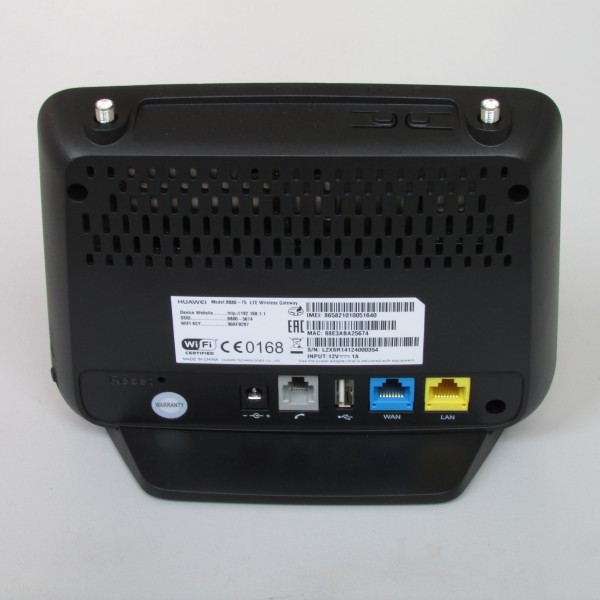
The Huawei B880 is available at www.4gltemall.com since the beginning of this year. It’s not a new LTE router on the market. But many people don’t quite know about this LTE Category 4 WiFi router. About LTE Category 4, speeds of up to 150 megabits per second downstream are achievable, provided the network and the tariff are also suitable. As a stationary router, Huawei B880 also offers a powerful WLAN module and a LAN interface for easy connection of a network-enabled device. The following data sheet you will find all the details for the Huawei B880.


Features and characteristics of Huawei B880

Manufacturer and model number Huawei B880
Chipset HiSilicon Hi6920
Download rate Up to 150 MBit/s
Upload rate Up to 50 MBit/s
Supported LTE Bands: LTE 2600 MHz / 1800 MHz / 800 MHz
backward compatible with: DC-HSPA+/ UMTS  (900 und bei UMTS 2100 MHz) and GSM/GPRS/EDGE: 850/900/1800/1900MHz
MIMO Support: MIMO 2x2
Connector for external antenna yes, 2 SMA connectors (Buy Huawei B880 Antenna)
Category: LTE Modem to Category 4 (CAT4)
Telephone
With integrated telephone system yes, VOIP SIP Client
Connection for analog phones yes, 1xRJ11
DECT no
integrator answering machine -
Network | LAN & WLAN
LAN Ports 1 LAN Port; 1 WAN Port
WLAN Standards 802.11b/g/n Wi-Fi for up to 32 users
5 GHz WLAN support no
Encoding WEP, WPA, WPA2
USB yes, 1x USB 2.0
Dimensions / Weight 15cm x 18cm x 9cm/ 400g
Information material
Manual Not available online
Available to buy on 4gltemall.com


Compact design, fast LTE  


The Huawei B880 is distinguished by the design quite different from its sister model, the Huawei B593. The latter is available for "Vodafone B2000" or "Telekom Speedport LTE II". The B880 is not only smaller than the B593, and it also has a completely different design and has fewer connection ports on the back. Inside the Huawei B880, there is a HiSilicon Hi6920 modem which supports speed up to 150 Mbit/s over LTE Category 4. If there is no LTE available on site, it is accessible via the UMTS accelerator DC-HSPA+ and nevertheless still get a speed of up to 42.2 Mbit/s in the downlink and 5.76 Mbit/s in the uplink. Two rear connectors on the back allow requesting the gain of the radio signal.


Devices of all kinds are either connected via LAN cable or via WLAN with the Huawei B880 LTE router. The LAN port reaches a maximum of 100 Mbit/s, Wi-Fi speed at least 150 Mbit/s. At least one Gigabit LAN port would have it may be. The maximum 32 WiFi devices could be connected simultaneously, which is appropriate for most users. As a special feature to mention is the USB 2.0 interface. Storage media or printers on the network for several terminals are available. After configuration is done, just like a normal router, a corresponding web interface that can be opened in any browser.    


VoIP Function  


As one of the few LTE Routers, Huawei B880 also has a phone function. While no calls are possible directly via the mobile network, but the device is designed for Voice over IP (VoIP) and can be configured accordingly. An analog telephone can be connected to the RJ-11 port on the back.  

Availability and Price  


The Huawei B880 LTE router is in online trading, the unlocked Huawei B880 would work with almost all the 4G network operators in Europe, Asia and Australia. So If you are want higher link speed, Huawei B880 is a good wireless gateway to consider.  

Monday, August 25, 2014

How to Update Huawei E398 Firmware

Just like mobile phone, if a 4G modem is used for long time, there will be some errors such sudden connection terminated, no signal, don’t read SIM card, no response when plug in etc.. During this time, it’s necessary to update the firmware of the 4G modem and let it work well. This process is like the re-install the operation system in PC. After update, the 4G modem will connect smoothly, and quickly. In some case, the connection speed may increase obviously with same SIM card.  


Huawei E398 is one of the best 4G USB modem that was used by thousands of customers over the world. Some users may want to update the firmware of their E398 but can’t find the driver or don’t know the user guide to update. Today, we will give the guide how to update the firmware of Huawei E398, hope it would help our customer to have better surfing experience on 4G networks:

1.  Plug the Huawei E398 to your PC

2. Install the old driver that is already with the E398

3. Download the update driver for E398 here: http://speedy.sh/jGaVd/E398-Update-11.335.31.00.000.B757.rar

4. Run the driver and follow the steps to update the firmware

5. On the third step, there is flash code required to proceed. On the website http://www.modemunlock.com/huawei.php  you can enter the IMEI number of your E398 and let it calculate, you will get the flash code 6. Enter the flash code to process the update. After finished, your E398 is with new firmware now  


What we have to mention is that on the step 5, you will also get the unlock code of your Huawei E398, if you want to unlock your E398, you can do it after firmware update. The website calculate your E398 unlock code, you note it and plug a SIM card that is different from the locked network, it will require unlock code to let them work together, now you can enter the noted unlocked code and get unlocked Huawei E398.   But if your E398 is already unlocked, it’s unnecessary to do the unlocking again. Any questions, welcome to leave your message on the blog.