Tuesday, November 24, 2015

Huawei E5180 LTE Cube Review

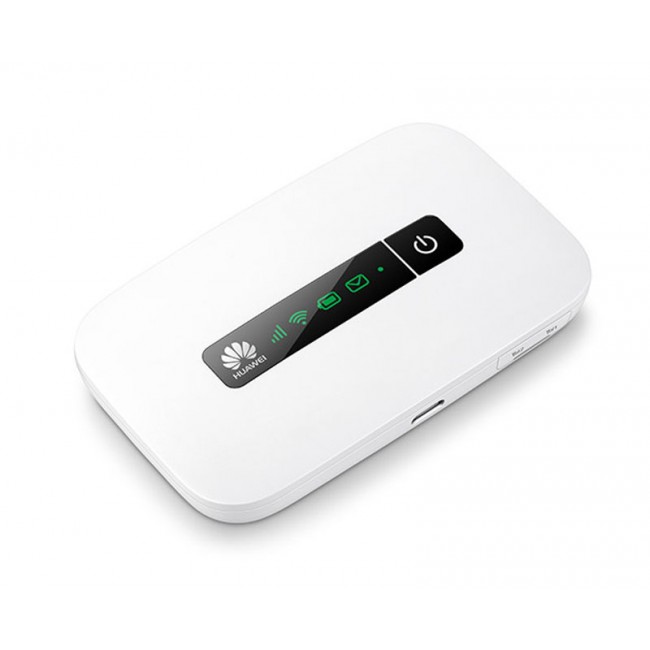
The Austrian provider A1 Telekom Austria presented an 4G/LTE+Internet box( also a new LTE router), the model number is Huawei LTE Cube E5180, which is hidden technically. The Box proves that a router does not have to look dull or even ugly: The technology of E5180 puts in a chic, white square whose design amazingly reminiscent of Apple.


Features and characteristics of Huawei LTE Cube E5180
Manufacturer and type designation Huawei E5180 LTE Cube
Download rate Up to 150 MBit/s
Upload rate Up to 50 MBit/s
Supported LTE bands: 800 MHz/1800 MHz/2600 MHz
LTE-Advanced Support No
Backward compatible with: UMTS; GSM; HSPA+
MIMO Support: MIMO 2x2
Connector for external antenna No
Category: LTE modem category 4 (CAT4)
Telephone
With integrated PABX No
VoLTE Support (Voice over LTE) No
Operating Internet (VOIP) Yes
Connection for analog phones yes, 1 x RJ11
Connection for ISDN phones No
DECT No
integrator with Voice Mail No
HD voice possible No
Network | LAN & WLAN
LAN Ports 1 LAN (RJ45), 100 Mbit/s
Wi-Fi standards WLAN 802.11b / g / n for up to 32 devices
5 GHz Wi-Fi support No
Coding WPA, WPA2, WPS
WLAN guest access installable ev. not available
Others
USB No
Mass weight 110 x 70 x 70 mm / 250 g
IPv6 Support k. A.
NAS capability No
Power consumption ca. k. A.
used as a Media Server No
Information material
Manual: Not yet available as a PDF
available since ... 01/11/2014
Available at www.4gltemall.com


Technical Features

With 11 x 7 x 7 centimeters and 250 grams in weight, the A1 Internet box 4G/LTE E5180 is portable enough to be used as a mobile LTE router. The micro-SIM card comes in a slot on the bottom of the unit. In addition to the technical specifications, the design attracts the eyes. It is probably no exaggeration to say that Huawei E5180 is the currently most fashionable LTE router in the world.  


Mobile Internet

With the support LTE Category 4 and provided an appropriate collective as well as a developed network, Huawei E5180 Cube could achieve download speeds of up to 150 Mbit/s and 50 Mbit/s speeds for upload at 800, 1,800 and 2,600MHz. If no LTE network available, thanks to the support of DC-HSPA+, the E5180 Cube could reach download speed up to 42 Mbit/s. The only drawback that we could find in the router: It has incomprehensibly no connections or ports for external antennas. Therefore, one should keep a close eye on reception quality. If the signal is weak, you should move the location of the cube.  


Wireless LAN

Up to 32 devices in the house can be supplied with the A1 Internet box 4G/LTE E5180 via WLAN. The connection is elegantly solved: By pressing the blue backlit lid of the box, Wi-Fi 802.11 b/g/n is activated. Huawei promises a wireless range of up to 250 meters with a possible maximum speed of 300 Mbit/s.  

Safety

At the same time, the cover also serves as a WPS button, with the click of a button easily and quickly WPS encryption is built (WPA and WPA2 are also supported). The A1 E5180 dominated UPnP (Universal Plug & Play) and is also protected by an integrated firewall.  

Connections

For wired Internet connections, the E5180 has only one Ethernet port, here you would already want multiple ports. On the back there are the RJ45 output, the RJ11 port for an analog phone or fax machine as well as the connection for the 12-volt power adapter.  

 Availability

The Internet box 4G/LTE E5180 there are offered by A1 for new customers at no extra charge when booking an A1 mobile Internet tariff (S/M/L). If you want the unlocked version of Huawei E5180 A1 Internet box, you can check the online website www.4gltemall.com . We provide international shipping with one year warranty.    

Wednesday, November 18, 2015

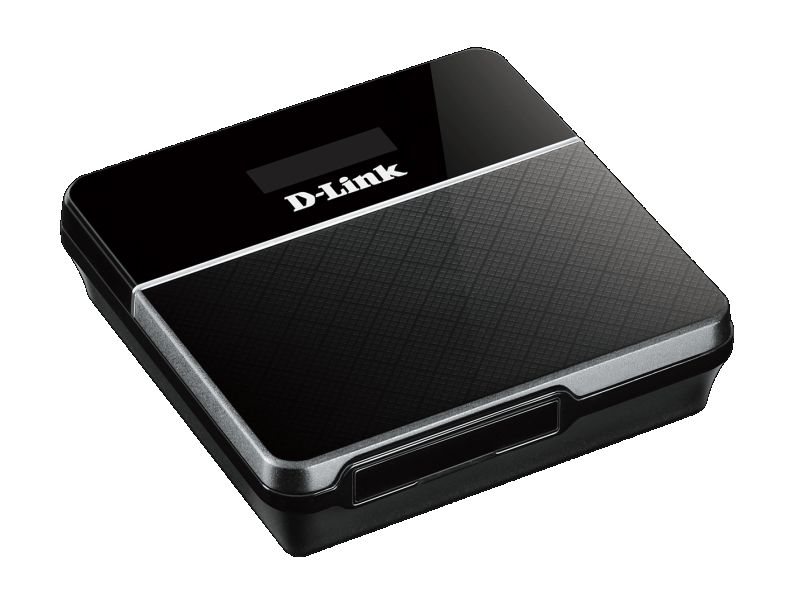
D-Link DW-932 4G LTE Cat4 Mobile Hotspot

The Taiwan manufacturer D-Link introduces a new LTE Cat4 router DW-932, which serves as a mobile wireless hotspot for smartphones and tablets. The DW-932 encrypted signals reliably and is compact enough for your pocket, but it also has its weaknesses. Today, we will have a look at the advantages and disadvantages of D-link DW932.
Features and characteristics of D-link DW-932
Manufacturer and model D-Link DW-932
Chipset: unknown
LTE Category: CAT4
Download rate Up to 150 Mbit/s
Upload rate Up to 50 Mbit/s
Supported LTE bands: 800 MHz / 1800 MHz / 2600 MHz
Backward compatible with: HSPA/UMTS/GSM
Support of LTE-Advanced: no
MIMO Support: 2x2
External antenna connector: no
Telephone
With integrated telephone system: no
Network | LAN & WLAN
LAN Ports: no
WLAN Standards: WiFi 802.11 b / g / n
5 GHz WLAN support: no
Encryption: WPS, WPA, WPA2
Wireless Internet Hotspot function: Yes
Others
Battery pack: 2,020 mAh
Dimensions: 73 x 73 x 15 mm
USB: MicroUSB
Memory card expansion: no
Release: 02/16/2015
Available at: www.4gltemall.com
 

Technical Features

  The D-Link DW-932 is an category 4 LTE router, ie, in a suitable micro-SIM card with LTE tariff, up to 150 Mbit/s could be achieved to surf the web. In upload, a maximum upload speed of 50 Mbit/s is possible. Where no LTE is available, the DW-932 can switch to UMTS network as backup. As a mobile hotspot, the device supplies a few devices could be connected to DW-932 (the exact number is not said by D-Link); the fast Wi-Fi ac is not supported.  

Secured multiple

Safety is a top priority at the DW-932: Pushing a button and get encrypted with WPA or WPA2 connection to other mobile devices made via WPS (WiFi Protected Setup). In addition, the router has an internal firewall and NAT (Network Address Translation). On the little display, D-Link DW-932 indicates the network type, signal strength, roaming status, incoming SMS, the Internet connection, the provider, the battery level and wireless encryption.  

Practical travel companion

  Although not exactly the black, DW-932 is a beauty, it is with dimensions of 7.3 x 7.3 x 1.5 centimeters at 77 grams of weight, which is very compact and so perfectly suited as a mobile travel companion. It can provide his services on holidays available if it supplies the whole family with "Free WiFi" with only a local prepaid card.  

Battery with disappointing endurance

The DW-932 Battery has the capacity of 2,020 mAh on the paper. However, in our test, the  useful life is only 4 hours, which would be below the average and very disappointing. Other manufacturer do this better, for example, the Huawei E5878 Prime with a weaker battery could runs twice long surfing time. To charge the battery, you need connect the USB port of a PC.    

Conclusion

Even if it is handy and convenient, the D-Link DW-932 has a few weaknesses. Here now we have other alternatives from Chinese Huawei and ZTE, the recommend models are Huawei E5372, ZTE MF93D. They are popular in Europe and Asia.  

Monday, November 16, 2015

TP-Link TL-MR3020 3G/4G Wireless N Router

The TP-Link TL-MR3020 is a small, handy wireless router with a USB port, which can make him a Wi-Fi hotspot, but user has to connect an LTE stick or an LTE modem to the router. TL-MR3020 work with the LTE stick to provide wireless Internet.
Features and characteristics of TP-link TL-MR3020
Manufacturer and model TP-Link TL-MR3020
Chipset: Atheros AR9330
LTE Category: depending on the LTE stick used
Download rate up: "
Upload rate to: "
Supported LTE bands: "
Backward compatible with: "
MIMO Support: 1x1
External antenna connector: no
Network | LAN & WLAN
LAN Ports: 1 x RJ45
WLAN Standards: WiFi 802.11 b/g/n
5 GHz WLAN support: no
Encryption: WPS, WEP, WPA, WPA2
Wireless Internet Hotspot function: Yes
Others
Battery pack: no
Dimensions: 74 x 67 x 22 mm
USB: USB 2.0 / mini USB
Memory card expansion: no
Release: November 2011
available at: www.4gltemall.com
 

Technical Features

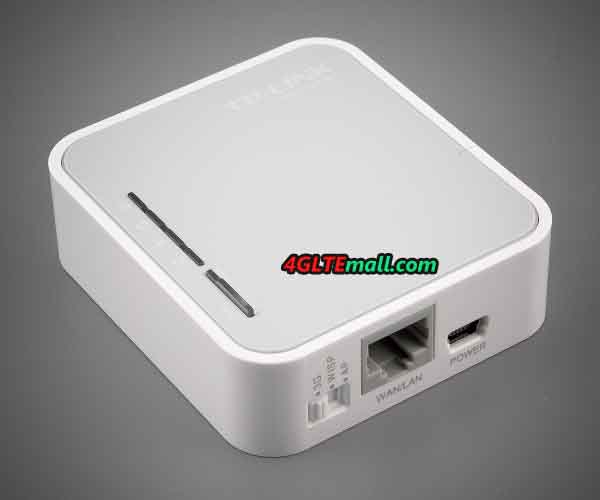
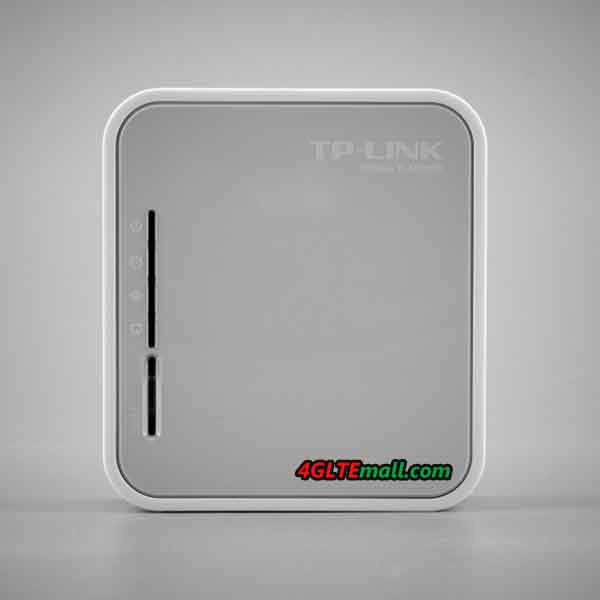
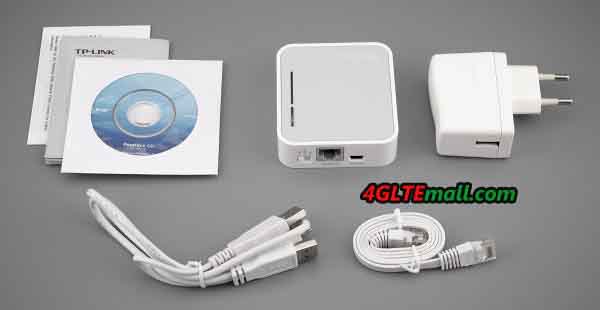
With dimensions of 7.4 x 6.7 x 2.2 centimeters, the small white box TP-Link has the right size for on the go. The TL-MR3020 has an Ethernet port (RJ45) for a LAN connection, a mini-USB port for power supply via an adapter or a PC and a standard USB input for connecting a mobile drives or modems. The TP-Link TL-MR3020 has no display, but only through green LEDs that indicates the Internet connection, the WLAN status and LAN connection as well as encryption. A slider can switch between 3G/4G, and WISP AP. WISP (Wireless Internet Service Provider) stands for Wi-Fi access, AP (Access Point) for a wired internet connection.  

Wi-Fi hotspot via LTE-Stick

If you put an LTE stick in the USB port of the TL-MR3020, a data connection to an available LTE network is established in 3G or 4G mode. Subsequently, the TP-Link TL-MR3020 connect with devices such as laptop, smartphone or tablet as wireless hotspot to provide Internet via Wireless LAN. What's more, the TP-link TL-MR3020 can support 802.11b/g/n with up to 150 Mbit/s at 2.4 GHz.  

Ensures security

The TL-MR3020 has the way over an IP QoS function (Quality of Service), with the leave of bandwidth as desired spread on the connected devices. The safety of the data links ensures encryption up to WPA2 via WPS button (WiFi Protected Setup) which can be prepared quickly. A firewall is also on board.   The router can be configured via its own URL with a browser. Supported browsers include Internet Explorer, Firefox, Chrome and Safari as well as the operating systems Windows (from 98), Mac and Linux. By the way, it is recommended to download the manufacturer TP-Link the latest firmware for the router to ensure compatibility with as many modems and sticks.    

Conclusion

What benefit a wireless router can bring to you into which you can slot in its mobile stick? First of all, if you have an LTE stock, you will get a new mobile hotspot with their combination. In addition, Hotspot and stick can be placed where the best wireless coverage exists. You can also use the Ethernat cable in a hotel or at home to get Wifi network.   The TL-MR3020 is recommended only if you already own a mobile stick and usually  travel and would like to connect more than one device. Otherwise it is better to buy a real mobile router such as huawei E5776, ZTE MF93D. They don't need USB stick and can work directly with SIM cards.   If you want to know more latest 4G LTE mini Routers, welcome to click here:  http://www.4gltemall.com/3g-4g-pocket-wifi/300mbps-mobile-wifi.html

Wednesday, November 11, 2015

Vodafone R216(Huawei) 4G LTE Mobile Hotspot

As the successor of the LTE router R215, Vodafone takes the new mobile hotspot R216 in its range. The R216 dominated LTE category 4 and is again produced by Huawei. Alternatively, the sister model produced by the Chinese competitor ZTE R216Z to select which has features similar specifications.
Features and characteristics of Vodafone R216
Manufacturer and model number Vodafone R216(Huawei)
Chipset: HiSilicon Balong 711
LTE Category: CAT4
Download rate up: Up to 150 Mbit/s
Upload rate to: Up to 50 Mbit/s
Supported LTE bands: 800 MHz / 1800 MHz / 2600 MHz
Backward compatible with: DC-HSPA+ / UMTS / GSM
Support of LTE-Advanced: no
MIMO Support: Yes
External antenna connector: no
Telephone
With integrated telephone system: no
Connector for ISDN telephones: no
Connection for analog telephones: no
DECT: no
integrator answering machine: no
Network | LAN & WLAN
LAN Ports: no
WLAN Standards: Fi 802.11 b/g/n
5 GHz WLAN support: Yes
Encryption: WPA, WPA2
Wireless Internet Hotspot function: Yes, for up to 10 devices
Others
Battery pack: 1,500 mAh, exchangeable
Dimensions: 96 x 58 x 13 mm
USB: USB 2.0
Memory card expansion: no
Release: April 2015
available at: www.4gltemall.com
 

Technical Features

  The Vodafone R216 accepts cards on the mini SIM format and accesses the LTE network of category 4 to download with speeds up to 150 Mbit/s and 50 Mbit/s upstream. Here, the mobile router uses 5 frequency bands: Besides the usual bands 800, 1,800 and 2,600 MHz additionally 850 and 900 MHz, which are used in the US and Asia for LTE.    

LTE to 150 Mbit/s and UMTS to 42 Mbit/s

  The R216 is backwards compatible with UMTS, including DC-HSPA+ and GSM and radio in the WLAN b/g/n to 2.4 and 5 GHz. WLAN ac is not supported. Up to 10 connected devices can be supplied. The router does not have connections for external antennas. The Vodafone R216 has a Huawei subsidiary HiSilicon Balong-711 chipset, the 128 MB RAM and 256 MB ROM stand aside. A memory expansion via an SD card is not provided.

No status display

  Vodafone R216 does not have a display. Information on the device itself can only be seen from the LED, and this indicates only when the battery has enough charge, the connection is active on the network or a new SMS has been received.

Future-proof thanks to IPv6

  So you have access to more information and settings on the interface of the router on Web PC - or you use the Vodafone Mobile Internet App for smartphones and tablets. After all: The Vodafone R216 already dominates the Internet Protocol 6 (IPv6), which may facilitate, inter alia, the configuration of connected devices in a home network.  

Replaceable battery

  The battery of the R216 comes with only 1,500 mAh somewhat underpowered, and the battery Is changeable. Vodafone provides a runtime of up to 8 hours in 3G network and 6 hours in 4G network, with each 5 users simultaneously. In standby, the battery will hold about 300 hours. Charging battery can use the supplied USB cable, either on the PC or via an adapter to the electrical outlet.  

Vodafone R216-Z( ZTE)

  There is a brother model named Vodafone R216-Z. The slightly more compact sibling with the suffix Z is also designed for LTE Cat4, is equipped with a different chipset Qualcomm MDM 9225 from the manufacturer ZTE. The Vodafone R216-Z has 512M ram bout twice as much flash memory, the router also can be used for memory expansion micro SD card holds up to 32 GB. It also has a wireless repeater function and two sockets for external antennas to improve reception quality. Also the R216-Z battery is significantly stronger than the R216 with 2,300 mAh. However, a display does not have even the Vodafone R216-Z.  

Conclusion

The Vodafone R216 Huawei is a mid-LTE router, the display and SD card slot is missing. The Vodafone R216-Z ZTE has to offer as even more with memory expansion and a stronger battery. If you want to see more details, welcome to check on www.4gltemall.com .  

Monday, November 9, 2015

Huawei HiLink Carfì E8377

This mobile LTE hotspot Huawei CarFi E8377 is for your car, it’s designed for the network solution in a car. It is simply plugged into the cigarette lighter and provides the mobile devices of the occupant via LTE with fast internet. All the key data and performance values here.    
Features and specifications of Huawei Carfì E8377
Manufacturer and model number Huawei E8377 HiLink Carfì
Chipset: not known
LTE Category: CAT4
Download rate Up to 150 Mbit/s
Upload rate Up to 50 Mbit/s
Supported LTE bands: 800 MHz/1800 MHz/2600 MHz
Backward compatible with: DC-HSPA+/UMTS/GSM
Support of LTE-Advanced: no
MIMO Support: no
External antenna connector: yes, 1x TS-9 (Buy Huawei E8377 Antenna)
Network | LAN & WLAN
LAN Ports: no
WLAN Standards: WiFi 802.11 b/g/n
5 GHz WLAN support: no
Encryption: WEP, WPA, WPA2
Wireless Internet Hotspot function: Yes, for up to 10 devices
Others
Battery pack: none
Dimensions: 59 x 49 x 88 mm at about 150 grams
USB: Standard USB port
Memory card expansion: no
Release: February 2015
available at: www.4gltemall.com
   

Technical Features

  The Huawei HiLink Carfì is almost 9 centimeters long and a weight of just 150 grams. The manufacturer's specification of just under 50 grams proved to be false after our test. It is plugged into the cigarette lighter and play for the vehicle and does not require any special installation. Operation is via a browser interface or via the "Mobile WiFi" app from Huawei, which is available both for Apple's iOS as well as Android smartphones. It’s possible that the data consumption can be monitored via the stick, as well as sending and receiving text messages.      

With LTE Cat4 Technology

  The Huawei HiLink Carfì E8377 is compatible with LTE category 4 and provides a data connection  with inserted micro-SIM card, matching tariff and of course LTE availability during the journey. Up to 150 Mbit/s downstream and 50 Mbit/s upload could be achieved. Besides the usual frequency bands at 800, 1,800 and 2,600 MHz in Europe, the 900 MHz and 2100Mhz are also supported for trips abroad. Where no LTE network is available, the CarFi E8377 reverts to UMTS including DC-HSPA+ with download speeds of up to 42 Mbit/s.  

Wi-Fi for up to 10 devices

  Subsequently, the mobile hotspot for up to 10 connected mobile devices in the car can be supplied with supported Wi-Fi  802.11 b/g/n. The data connection is possible via WEP, WPA or WPA2 encryption. In addition, an external antenna can be connected to improve reception on HiLink Carfì. An integrated protective function is to regulate the operating temperature of the sticks and so prevent it overheats.  

Useful charging function via USB

  the HiLink Carfì is equipped with a standard USB port; smartphones or tablets can also be recharged while driving through the Huawei CarFi.  A USB cable is not provided with the CarFi. The stick itself is powered by the cigarette lighter with 12 volts, according to Huawei  and it consumes less than 20 watts of power, and it is not intended as the car battery take excessively. In addition, it switches off automatically after two hours of inactivity. The HiLink Carfì also has its own built-in battery with 1,900 mAh capacity, can therefore also perform his duties outside the car.    

Conclusion

  Huawei E8377 Hilink CarFi can connect into the LTE network during driving and provides the occupants "Free WiFi" for their smartphones and tablets, sounds practical. To continuously ensure the maximum surfing speed, the LTE network still needs to be better developed well. After all, as well as UMTS is supported, the Huawei HiLink Carfì is easily supplied via the cigarette lighter power, can charge other mobile devices via its USB port and even has its own battery, are further plus points.   The Huawei HiLink Carfì is in the color black and commercially available on www.4gltemall.com. If you like it, welcome to check.  

Wednesday, November 4, 2015

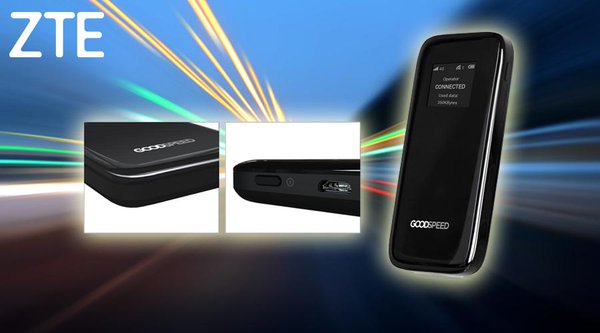
Uros Goodspeed ZTE MF900 LTE Mobile Hotspot

For many devices, it has become a must to have access to the Internet abroad. It may be due to that one wants to share his vacation photos via Facebook or Instagram with friends, or that you have to work as a business traveler outside his hotel with the laptop.  The Finnish company Uros offers with their mobile hotspot Goodspeed MF900 on a solution that now dominates LTE.

Features and Specifications of Uros Goodspeed MF900

Manufacturer and Model Number

ZTE MF900 (Uros Goodspeed)

Chipset:

Qualcomm MDM9225 Gobi

LTE Category:

CAT4

Download rate

Up to 150 Mbit/s

Upload rate

Up to 50 Mbit/s

supported LTE bands:

850/900/1700/1800/1900/2100/2600 Mhz

backward compatible with:

DC-HSPA+ / UMTS / GSM

Support of LTE-Advanced:

no

MIMO Support:

WLAN MIMO

External antenna connector:

no

Network | LAN & WLAN

LAN Ports:

no

WLAN Standards:

WiFi 802.11 b/g/n

5 GHz WLAN support:

yes (5.8GHz)

Encryption:

WPA, WPA2

Wireless Internet Hotspot function:

Yes, for up to 14 devices

Others

Battery pack:

3,200 mAh

Dimensions:

123 x 62 x 14 mm

USB:

MicroUSB

Memory card expansion:

no

available at:

www.4gltemall.com

Technical Features  

The previous Hotspot sold by Uros could offer a maximum 3G speed. The new model MF900, which is offered from July, is produced by ZTE and has a Qualcomm chipset (MDM9225 Gobi), which has an LTE module of category 4. The download speed to a maximum of 150 Mbit/s and upload speed to 50 Mbit/s could be achieved, of course only where a LTE network is available. It supports most 7 LTE bands. The Hotspot produces a wireless b/g/n network  to 2.4 and 5.8 GHz, in which up to 14 mobile devices such as tablets, smartphones or laptops can dial in order to surf the Internet.    

Display & Battery  

The ZTE MF900 hotspot, which comes in the design of a smartphone and pocket fit with 125 grams, has a small display that can display the name of the used mobile network, the number of connected devices, the used data volume and the battery level. In addition, the name and password of the generated Wi-Fi network can be displayed in order to make it available to other users. The strong battery of MF900 is 3,200 mAh and can take 12 hours active use time or 7 days standby time, which is approximately the same length as a smartphone.  


Support for up to 10 SIM cards  

10 SIM card slots are available, each 5 are on each side: Taking the front panel of the instrument, shows the unique selling point of the Goodspeed router. If you use the Goodspeed MF900 Hotspot in other countries, the hotspot automatically switches to the local network mode to support the available network, so you have to worry about anything.    


77 countries worldwide  


Uros offers SIM cards for 77 countries worldwide (Jul. 2015). Europe is expected to be already well covered with more than 30 countries. In Asia and in the Americas, more than a dozen countries are supported, including the US and Canada, Argentina and Brazil, Japan and Thailand. According to the provider, the number of available countries will be further expanded. Through a partnership with Vodafone, Turkey, Romania, Malta, Albania and seven African countries are added, including South Africa.  

Availability & Price  

The Uros Goodspeed 4G Mobile Hotspot is now available on the shop www.4gltemall.com, you can buy at a fixed price right in the shop. But you have to buy a contract from the network provider. 4gltemall.com only provides the devices, the contract SIM is not available with the device.  

Tuesday, November 3, 2015

Huawei E5373 4G LTE Router

The Huawei E5373 is an affordable mobile LTE router with integrated battery and WLAN hotspot feature. The integrated modem in E5373 can reach speeds of up to 150 megabits per second in the LTE network. Instead of expensive extras such as a display installed on the front, the manufacturer has focuses on the essentials about integrated dual-band Wi-Fi. In the following information sheet, you will find all the details for Huawei E5373.    
Features and specifications of Huawei E5373 router
Manufacturer and model Huawei E5373
Chipset: HiSilicon
LTE Category: LTE modem category 4 (3GPP Release 9)
Download rate Up to 150 MBit/s
Upload rate Up to 50 MBit/s
Supported LTE bands: LTE800, LTE900, LTE1800, LTE2100, LTE2600
Backward compatible with: DC-HSPA+, UMTS, GSM (UMTS 900 and 2100MHz )
Support of LTE-Advanced: no
MIMO Support: MIMO 2x2
External antenna connector:

Yes; 2 antenna connectors available(buy Huawei E5373 antenna)

Network | LAN & WLAN
LAN Ports: no
WLAN Standards: 802.11a/b/g/n
5 GHz WLAN support: no
Encryption: WPS/WPA/WPA2
WiFi Extender function: no

Wireless Internet Hotspot function:

Yes, up to 10 devices
Others
Battery 1500 mAh (6 hours)
Dimensions: 93 x 57 x 13 mm at 82 grams
USB: 1x Micro USB 2.0
Memory card expansion: Micro-SIM card slot (up to 32GB)
Release: about August 2015
available at: www.4gltemall.com

LTE Cat4 and DC-HSPA+

  The centerpiece of the Huawei E5373 is a cellular modem HiSilicon, a subsidiary of manufacturer Huawei. The modem supports all important for Europe frequency bands and allows data rates of up to 150 Mbit/s downstream and 50 Mbit/s upstream depending on the network. In practice, however, the rate could usually be well below the maximum. If LTE network is unavailable, the modem supports both GSM and UMTS networks, the two older wireless technologies. In the UMTS network, it also allows up to 42.2 Mbit s download and 5.76 Mbit/s upload speed if the data accelerator DC-HSPA+ are used.   On the body side of Huawei E5373, you can find two connections for an external antenna. The connector type is TS-9. When the device is in low data rates or unstable Internet connection, an external antenna is recommended. The two connectors are hidden under a cover.  

Dual Band WLAN

Up to 10 units can connect to the E5373 LTE router simultaneously via WLAN. Another device may also take advantage of the Internet connection via the microUSB connector and the cable supplied. The manufacturer Huawei has opted for a module, which can send and receive both at 2.4 GHz and 5 GHz. The 5 GHz band is particularly useful when the frequency range is overloaded on 2.4 GHz, which may often happen on large-scale events or in a residential area with many local residents.  

6 hours operating time

The Huawei E5373 has a battery with a capacity of 1500 mAh. The energy storage unit is easily replaceable by the user, so if necessary, you can buy a second battery to extend the operating time. According to Huawei, one can expect a runtime of up to 6 hours of continuous operation, then the battery needs to be charged through the microUSB connector again.  

Availability and price

Now the Huawei E5373 is available on www.4gltemall.com .The price is in budget without a contract. In the mobile operators in Germany, Austria and Switzerland, the LTE router is not available, so you should look around when necessary for a separate data plan with a provider of their choice. Huawei E5373 can work well with almost all network provides in Europe, if you usually travel or go outdoor, it's a good partner!