Tuesday, September 22, 2020

Sierra Wireless AirPrime EM7431 LTE Cat7 Embedded Module

Sierra Wireless AirPrime EM7431 LTE Cat7 Embedded Module


* LTE Cat7 Embedded Module


* Target region: Japan


* LTE DL 300Mbps, UL 150Mbps


* Satellite Systems: Galileo, Glonass, GPS, BeiDou


* Planned Carrier: DCM, SBM, KDDI

Sierra Wireless AirPrime EM7421 LTE Cat7 Embedded Module

Sierra Wireless AirPrime EM7421 LTE Cat7 Embedded Module


* LTE Cat7 Embedded Module


* Target region: EMEA, APAC


* LTE DL 300Mbps, UL 150Mbps


* Satellite Systems: Galileo, Glonass, GPS, BeiDou


* Planned Carrier: Telstra

Sierra Wireless AirPrime MC7431 LTE Cat7 Mini PCIe Embedded Module

Sierra Wireless AirPrime MC7431 LTE Cat7 Mini PCIe Embedded Module


* LTE Cat7 Embedded Module


* Target region: Japan


* LTE DL 300Mbps, UL 150Mbps


* Satellite Systems: Galileo, Glonass, GPS, BeiDou


* Planned Carrier: DCM, SBM, KDDI

Sierra Wireless AirPrime MC7421 LTE Cat7 Mini PCIe Embedded Module

Sierra Wireless AirPrime MC7421 LTE Cat7 Mini PCIe Embedded Module


* LTE Cat7 Embedded Module


* Target region: EMEA, APAC


* LTE DL 300Mbps, UL 150Mbps


* Satellite Systems: Galileo, Glonass, GPS, BeiDou


* Planned Carrier: Telstra

Sierra Wireless AirPrime MC7411 LTE Cat7 Mini PCIe Embedded Module

Sierra Wireless AirPrime MC7411 LTE Cat7 Mini PCIe Embedded Module


* LTE Cat7 Embedded Module


* Target region: North America


* LTE DL 300Mbps, UL 150Mbps


* Satellite Systems: Galileo, Glonass, GPS, BeiDou


* Planned Carrier: AT&T, Sprint, TMO, VzW

Sunday, September 20, 2020

Nokia Fastmile 5G Indoor Gateway Review

 Nokia FastMile 5G Gateway is a 5G WiFi router that allows you to use Telia's 5G connection in your home. In this guide, we review the device's introduction, features, commissioning, and solutions to problem situations.
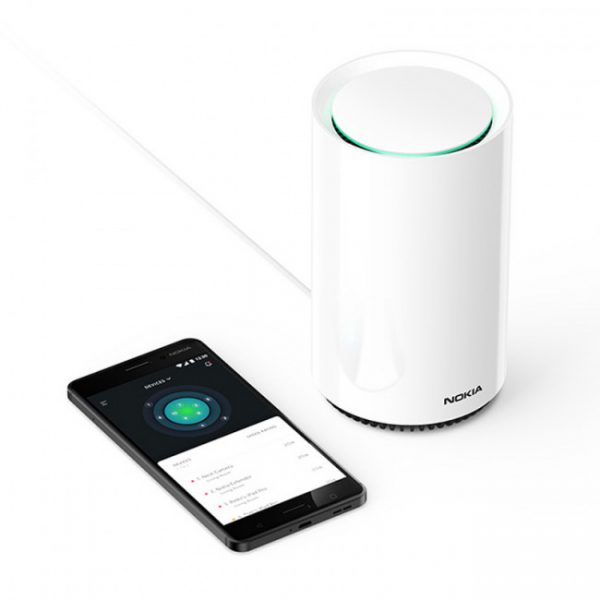
 

Nokia Fastmile 5G router technical Specifications:


  • Processor: Qualcomm SDX50
  • Dimensions: 240 x 140 mm
  • Weight: 2.2 kg
  • Sim card: Nano-sim
  • Connections: USB-C 3.0, 1x Gb WAN, 3x Gb LAN ports
  • Wifi: 802.11 b / g / n 3x3 2.4 GHz and 802.11 ac 4x4 5HGz
  • 5G network standard: 5G NR, 3GPP Rel 15 5G NR NSA option 3X
  • Network frequencies: 5G: n78, 4G: B1, B3, B7, B28, B40 (2100, 1800, 2600, 700 and 2300Mhz)
  • Operating temperature: 0 to 45 ° C
  • Maximum power consumption: 41 W
  • Warranty: 24 months
  • Other: Advanced 11 dBi directional antenna technology with auto-orientation, LED indicators for the best 5G reception direction, compatibility with Nokia WiFi Beacon devices


Nokia Fastmile 5G Gateway Quick Start
 

  1. Place the Nokia Fastmile router in an open area near the window.
  2. Turn the router so that you can see the bottom ports and switches. Make sure the power cord is not connected to the device yet.
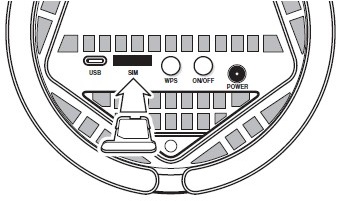
  3. Remove the sim card tray by gently pulling it to eject the card tray.
  4. Insert the nano-sized sim card into the card tray and insert the tray back into the device. (A.)
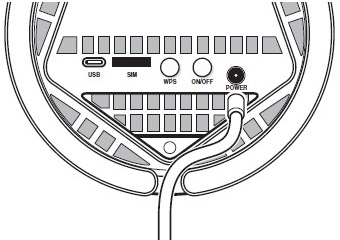
  5. Plug the power cord into the device and the plug end of the AC adapter into an electrical outlet. (B).
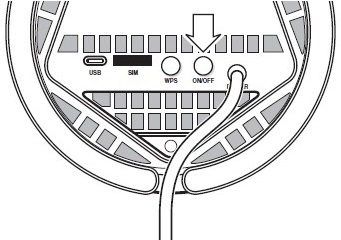
  6. Press the power (ON / OFF) button to turn on the device. (C).
  7. The LEDs on the top of the device turn on when the power is on. The device starts to retrieve the network connection.


  1. Insert the Sim card deck into the device.

  1. Connect the power cord to the device.

  1. Turn on the power.


The LEDs on the top of the device indicate the available network connection to the Nokia Fastmile.
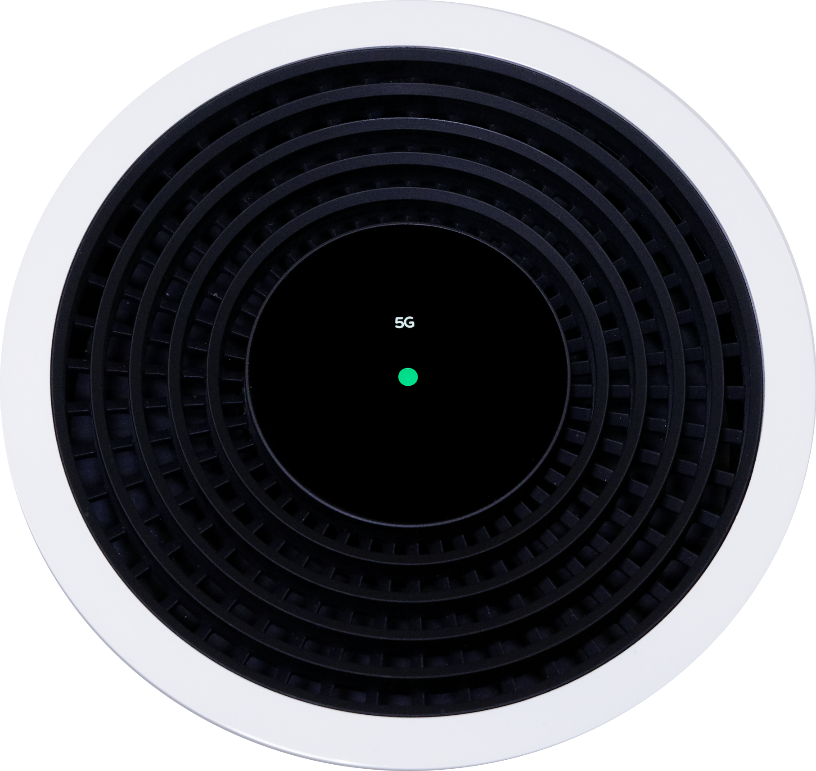


  1. Middle LED light
  • Solid green: 4G / LTE connection is available with good signal
  • Solid amber: 4G / LTE connection is available with avoidant signal
  • Solid orange: 4G / LTE connection is available with weak signal
    1. 5G LED light
  • Solid green: A 5G connection is available with a good signal
  • Solid amber: A 5G connection is available with an avoidant signal
  • Solid red or orange: 5G connection is available with weak signal
    1. Directional LED lights
  • There are five LEDs around the center of the top that light up for about 25 seconds when the device turns on. The LED that stays on indicates the direction from which the strongest 5G signal is coming.
  • Please note that 5G coverage is currently only available in limited areas, but we are expanding the network at a rapid pace. You can check the coverage areas of the 5G network on our website.


The directional LED light allows you to place the device in the best position for 5G coverage. When the device is turned on for the first time, check in which direction the LED is lit. If there is a window in the direction of the light and you can connect the appliance to the mains, unplug the appliance and move it. Turn the device back on and check the light. You may need to do targeting more than once to find the best location.


Nokia Fastmile 5G Router Interfaces:
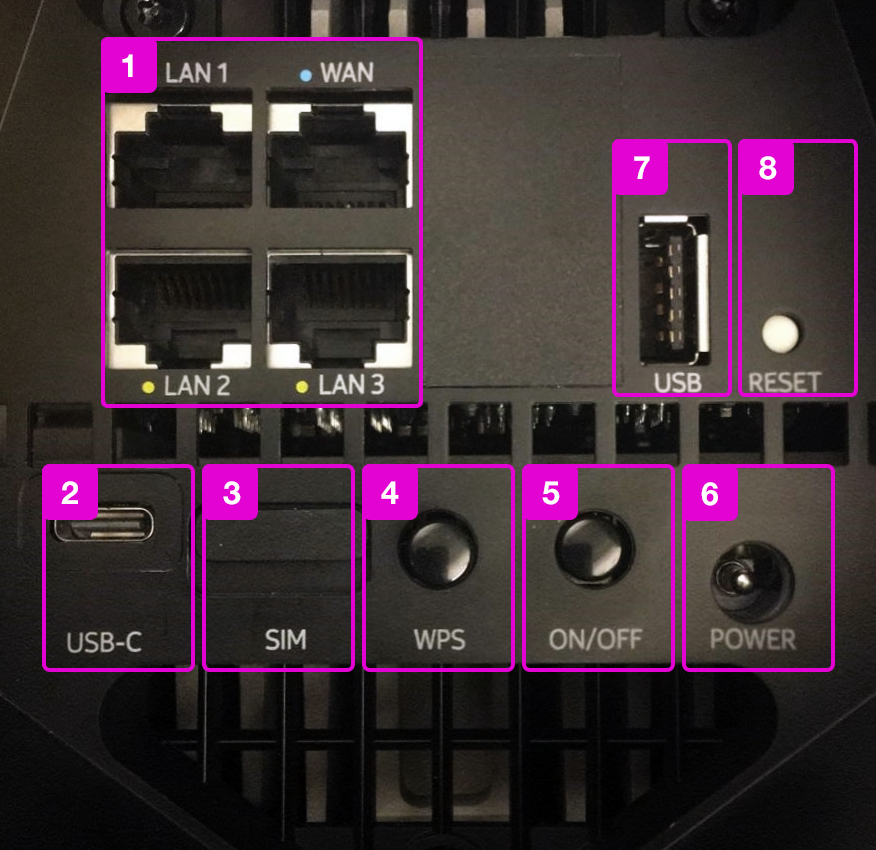
  1. Three LAN ports and one WAN port. You can connect your terminal, such as a computer, to the LAN port.
  2. USB-C port
  3. Sim card slot
  4. WPS button (To connect terminals to a wireless network using WPS, select WPS on the terminal as the connection method and press this button.)
  5. Power button
  6. Power cord port
  7. USB 3.0 port. An external memory source can be connected here if desired.
  8. Reset button. Pressing this for 10 seconds will reset the device to the factory settings.


Nokia Fastmile 5G Router Management Page

You can view and change device settings from the management page. The management page is logged in via the terminal's web browser.
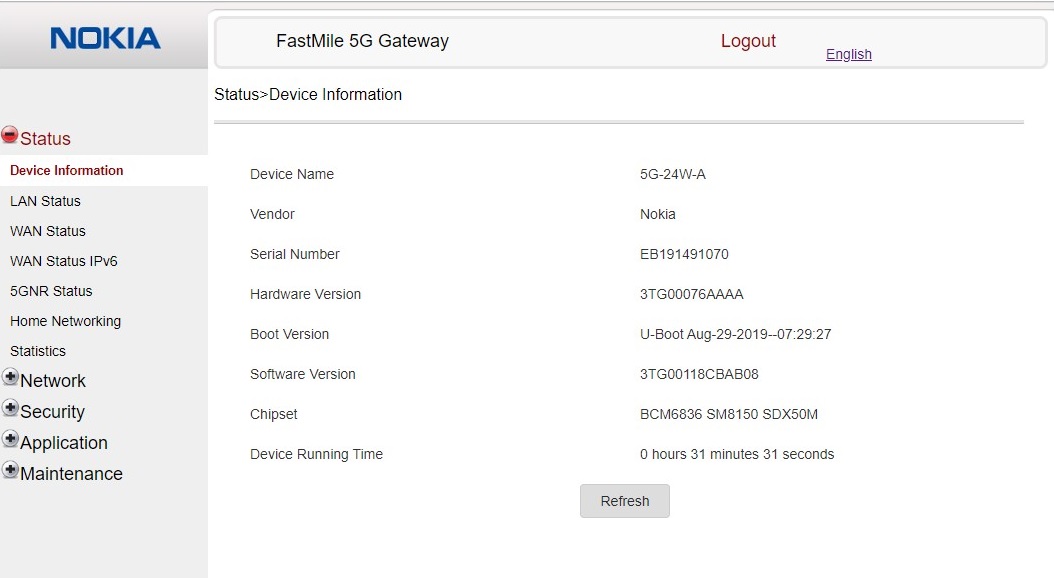
Note. The 5G network does not currently support the Opengate / Access Point service.


  1. Connect your terminal to the network of your Nokia FastMile router wirelessly or with a network cable.
  2. Once the terminal is connected to the Nokia 5G Router, you can log in to the management page with the terminal's web browser. (If the direct link doesn't work, type https://192.168.1.254 in the address bar.) The browser may not recognize the page as secure, so you'll need to open the page with a separate option (Advanced, etc.) that varies by browser.
  3. On the page you will be the first to see information about the device and below is the login button "Login".
  4. Press the Login button to open a login window where you enter the username and password for the management page.
  5. You can find this ID on the sticker on the bottom of your modem. You will find the username under "Username" and the password under "Password". The default username and password are both “Admin”.


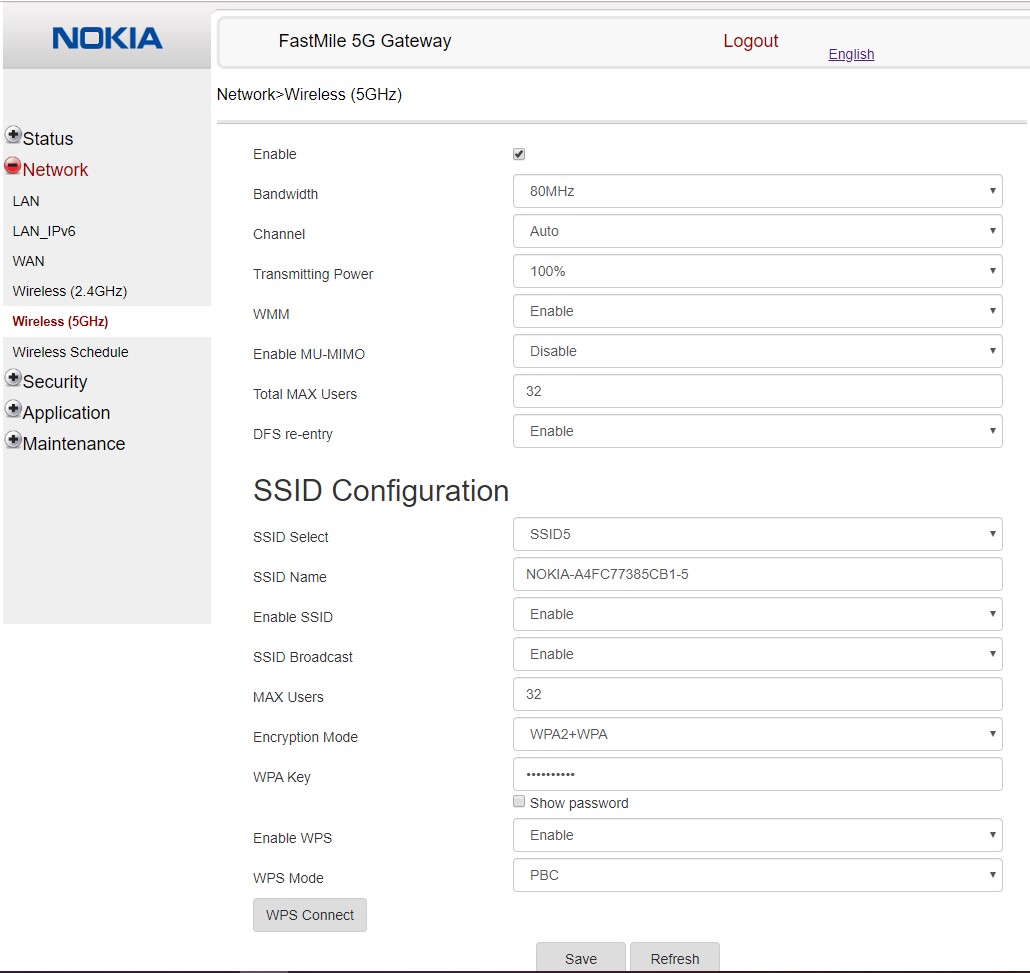
On the management page, you can change the wireless network name (SSID) and password by selecting “Network” from the menu on the left side of the page and then “Wireless (5 GHz)”. Changing your name and password will help you identify your wireless network more easily.


Tuesday, September 15, 2020

China Unicom 5G CPE VN007 Released

 China United Network Communications, which is one of the three China's mobile operators (MNO), launched a stationary wireless LAN router made by UNICOM VSENS COMMUNICATIONS in China. The 5G wireless router model number is China Unicom 5G CPE VN007. It is a stationary wireless LAN router that can use 5G services that comply with the NR method of the 5th generation mobile communication system (5G) provided by China United Network Communications.
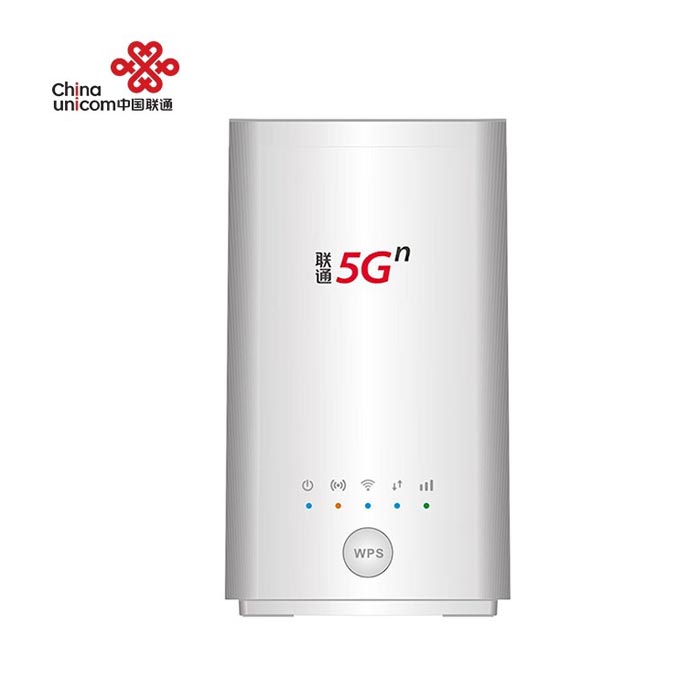


The 5G CPE VN007 is equipped with the UNISOC's first 5G multi-mode baseband chip of UNISOC V510 developed by China's UNISOC TECHNOLOGIES. The communication method supports NR/LTE method. The NR system is a dual mode 5G that supports both stand-alone (SA) and non-stand-alone (NSA) configurations.


The frequency corresponds to the sub 6 GHz band, and the theoretical value of communication speed is 2.3 Gbps maximum for downlink and 1.15 Gbps maximum for uplink. In the SA configuration, VoNR (Voice over NR), which realizes a voice call by the NR method, can be used, and a voice call can be used by connecting a stationary phone.


UNISOC V510 enables its terminal products to work even in the harsh industrial environment due to its industrial standard design, which can be widely used in enterprise wireless network, campus network, 5G industrial Internet of Things, and other fields.


The SIM card supports eSIM in addition to the physical Micro SIM (3FF) size SIM card. It also supports wireless LAN (2.4GHz/5GHz), which covers 360 degrees. It is developed through UNICOM VSENS COMMUNICATIONS, a wholly owned subsidiary of China United Network Communications, which is in charge of terminal related business, and manufactured by Guangzhou Tozed Kangwei Intelligent Technology of China.


There is only one color available for the China Unicom 5G CPE: white. The product has been available in China since July 15, 2020 through a dealer of China United Network Communications. The price of China Unicom VN007 5G CPE is 599.00USD. It is now available at www.4gltemall.com .